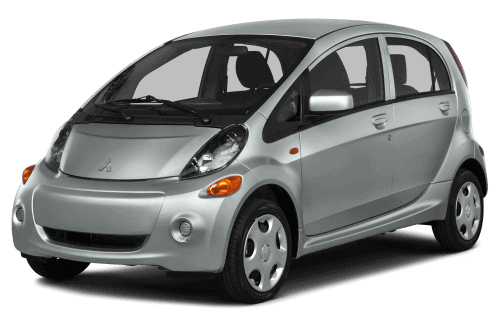
NHTSA Campaign Number: 17V793
Manufacturer Mitsubishi Motors North America, Inc.
Components AIR BAGS
Potential Number of Units Affected 144
Passenger Frontal Air Bag Inflator May Rupture
An inflator rupture may result in metal fragments striking the vehicle occupants resulting in serious injury or death.
Summary
Mitsubishi Motors North America, Inc. (MMNA) is recalling all 2016-2017 i-MiEV vehicles, equipped with certain air bag inflators assembled as part of the passenger frontal air bag modules used as original equipment or replacement equipment. In the event of a crash necessitating deployment of the passenger frontal air bag, these inflators may rupture due to propellant degradation occurring after long-term exposure to absolute humidity and temperature cycling.
Remedy
MMNA will notify owners, and dealers will replace the passenger side frontal air bag inflator, free of charge. The recall began on December 15, 2017. Owners may contact MMNA customer service at 1-888-648-7820. MMNA’s number for this recall is SR-17-008.
Notes
Owners may also contact the National Highway Traffic Safety Administration Vehicle Safety Hotline at 1-888-327-4236 (TTY 1-800-424-9153), or go to www.safercar.gov.
Check if your Mitsubishi has a Recall
| SUBJECT:
i-MiEV PASSENGER SIDE FRONTAL AIR BAG INFLATOR – SAFETY RECALL CAMPAIGN | No: SR-17-008 | ||||||||||||||||||
| DATE: December 2017 | |||||||||||||||||||
| MODEL: 2016 – 2017 i-MiEV | |||||||||||||||||||
| CIRCULATE TO: | [ X ] GENERAL MANAGER | [ X ] PARTS MANAGER | [ X ] TECHNICIAN | ||||||||||||||||
| [ X ] SERVICE ADVISOR | [ X ] SERVICE MANAGER | [ X ] WARRANTY PROCESSOR | [ X ] SALES MANAGER | ||||||||||||||||
PURPOSE
This campaign bulletin instructs dealers to replace the passenger side frontal air bag inflator with one from a different supplier. Dealers must return the subject air bag inflator per the instructions in the Parts Information section of this procedure.
BACKGROUND
Based upon a Defect Information Report submitted to the National Highway Traffic Safety Administration by TK Holdings (Takata), MMNA is recalling certain 2016-2017 i-MiEV vehicles.
Affected vehicles are equipped with a specific type of passenger side frontal air bag inflator provided by Takata that could be susceptible to rupture, due to excessive internal pressure, during a normal air bag deployment event. This condition is more likely to occur if the vehicle has been exposed to high levels of absolute humidity for an extended period of time.
AFFECTED VEHICLES
2016 – 2017 i-MiEV
CUSTOMER NOTIFICATION
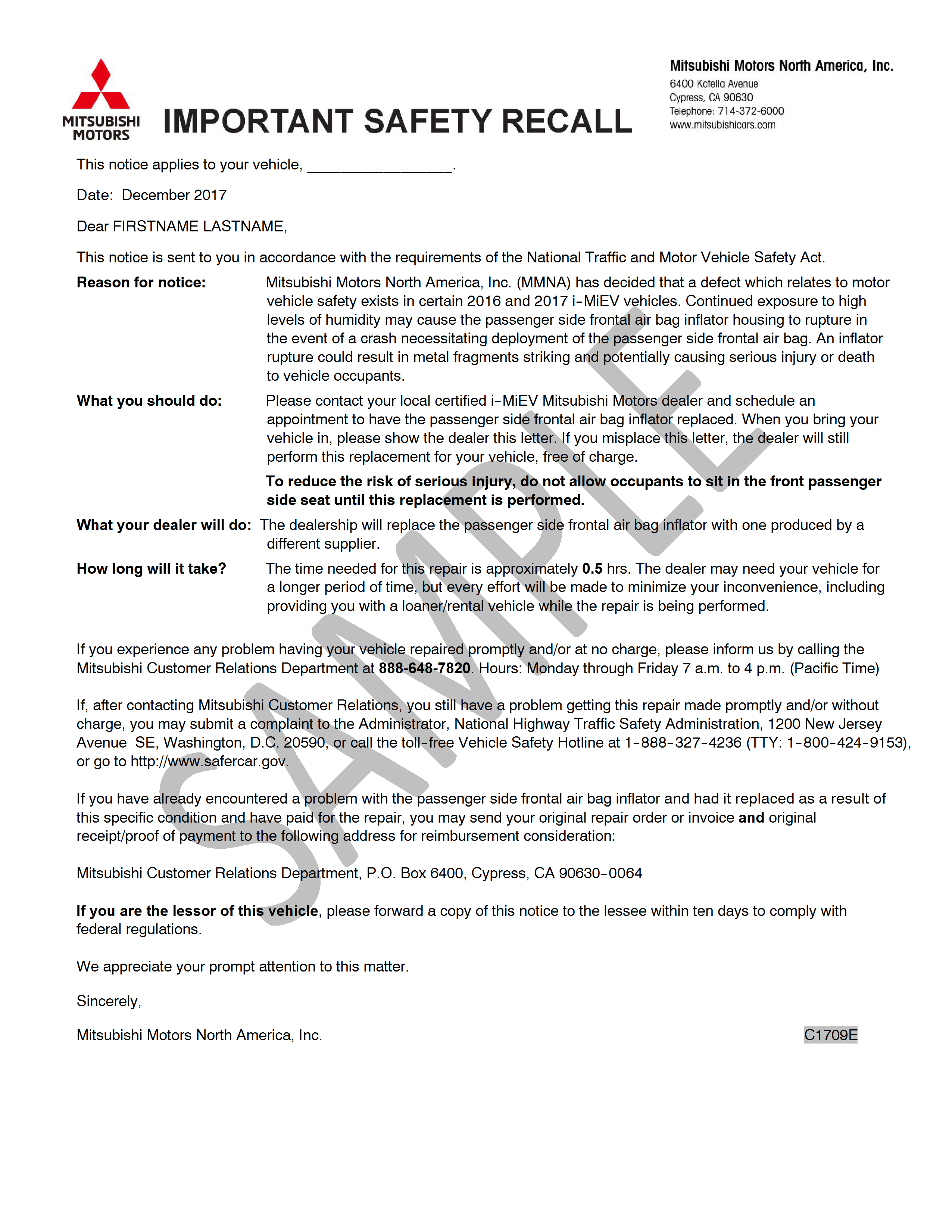
A letter will be sent to all owners of affected vehicles telling them to visit their certified i-MiEV Mitsubishi Motors dealer to have the passenger side frontal air bag inflator replaced. A sample customer notification letter appears at the end of this bulletin.
REQUIRED OPERATIONS
Before starting this campaign procedure, CHECK THE WARRANTY SUPERSCREEN to verify if the vehicle is an affected VIN for this campaign and that this campaign procedure has not already been completed.
REQUIRED EQUIPMENT
- VCI (Vehicle Communication Interface) or VCI Lite – MB991824 or MB992744V.
- MEDIC Laptop/Tablet with A/C power adapter – MIT540031 or FZG1MK2.
- MUT-III main harness ‘A’ (blue connector at the DLC end) – MB991910 or MB992745V.
- USB 2.0 cable – RRAR1MBR108GL.
- Clean Gloves
REMOVAL PROCEDURE
 Before starting work, and periodically while working on the vehicle, touch a metallic part of the vehicle with bare hands to discharge static electricity.
 Never attempt to disassemble or repair the air bag modules or clock spring. If faulty, replace it.
Do not drop the air bag modules or allow contact with water, grease or oil. Replace it if a dent, crack, deformation or rust is detected.
The air bag modules should be stored on a flat surface and facing upward. Do not place anything on top of it.
Do not expose the air bag modules to temperatures over 93o C (200o F).
 |
|
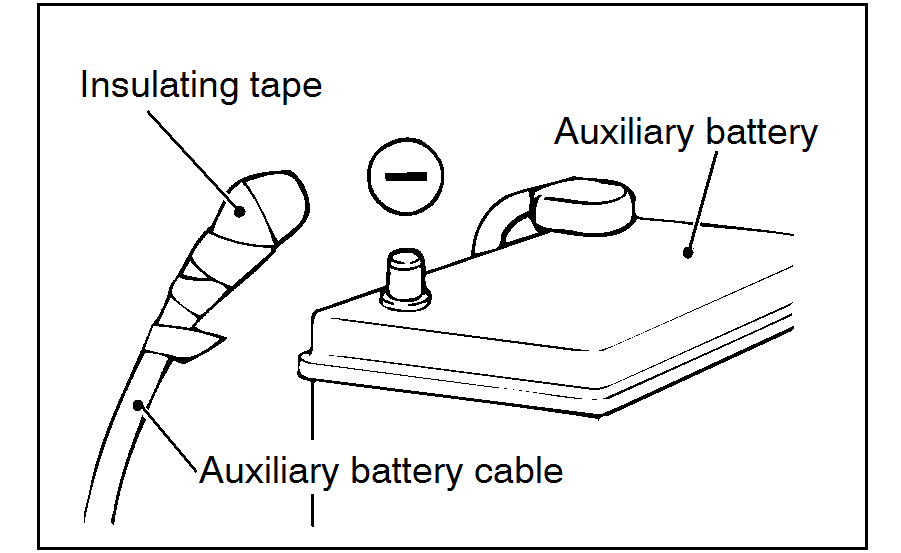
Wait at least 60 seconds after disconnecting the auxiliary battery cable before doing any further work, to prevent accidental air bag deployment.
Battery posts, terminals, and related accessories contain lead and lead compounds. WASH HANDS AFTER HANDLING.
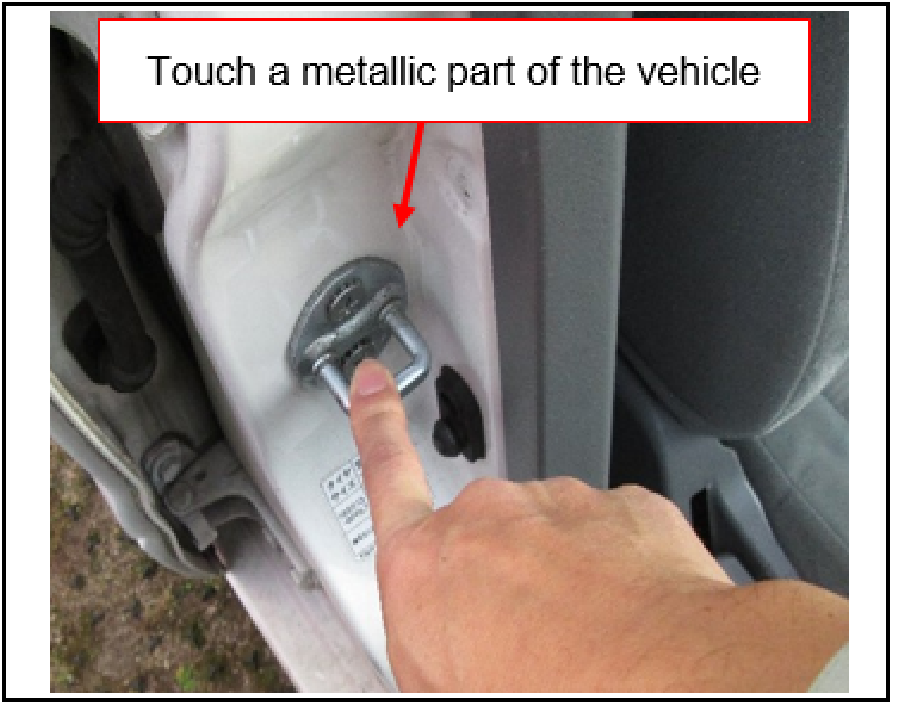 | CAUTION: ELIMINATE STATIC ELECTRICITY Before starting work, and periodically while working on the vehicle, touch a metallic part of the vehicle with bare hands to discharge static electricity. |
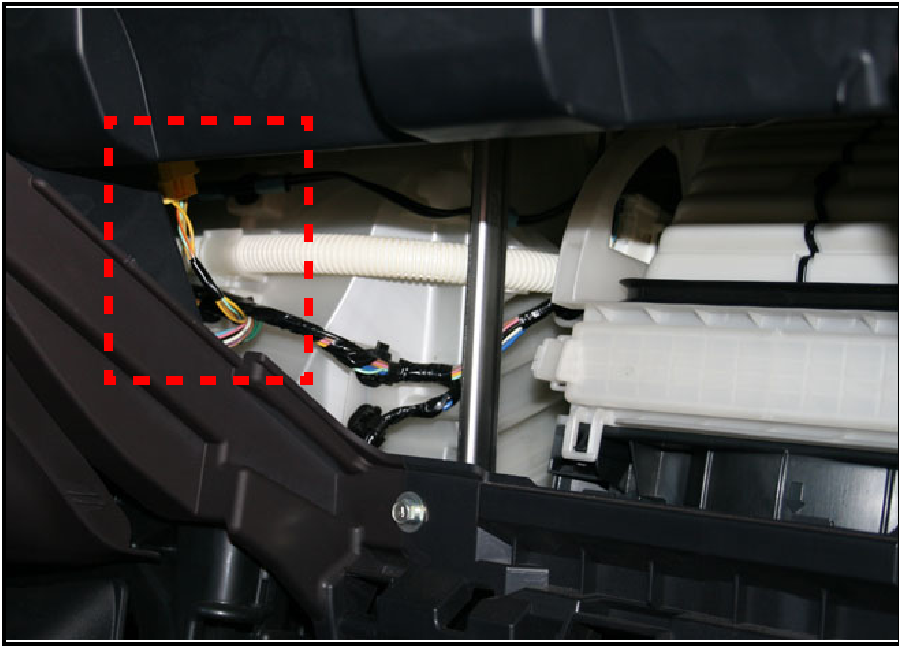 |
|
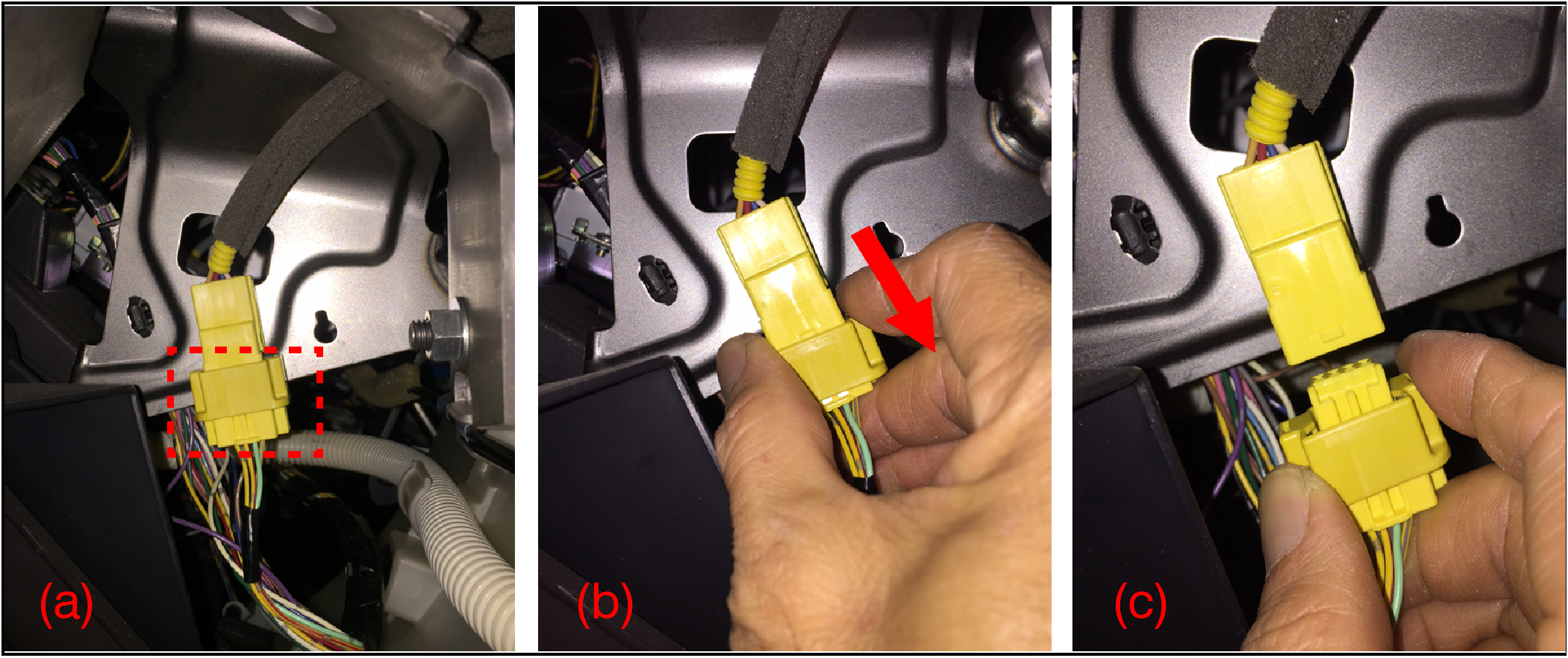 | |
- Identify the compressible connector sleeve (a).
- Compress the sleeve in the direction of the arrow (b).
- Disconnect the harness connector (c).
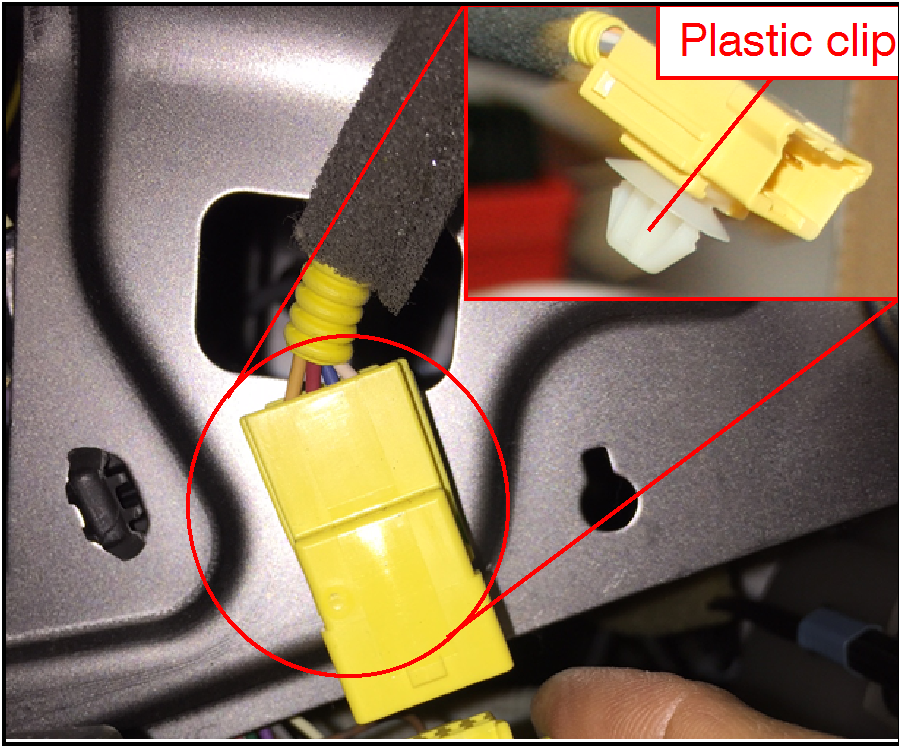 |
|
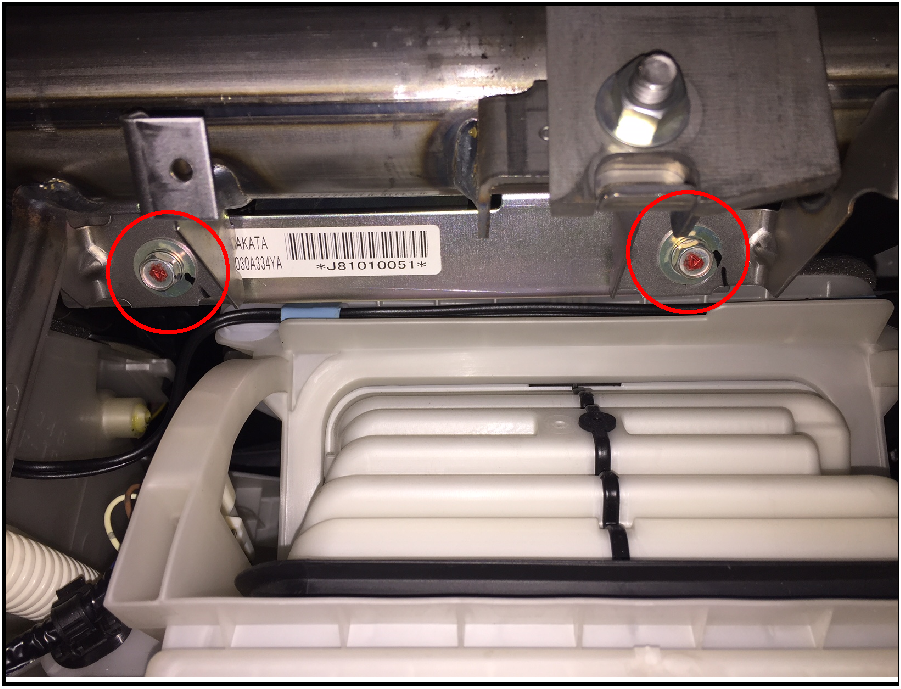 |
|
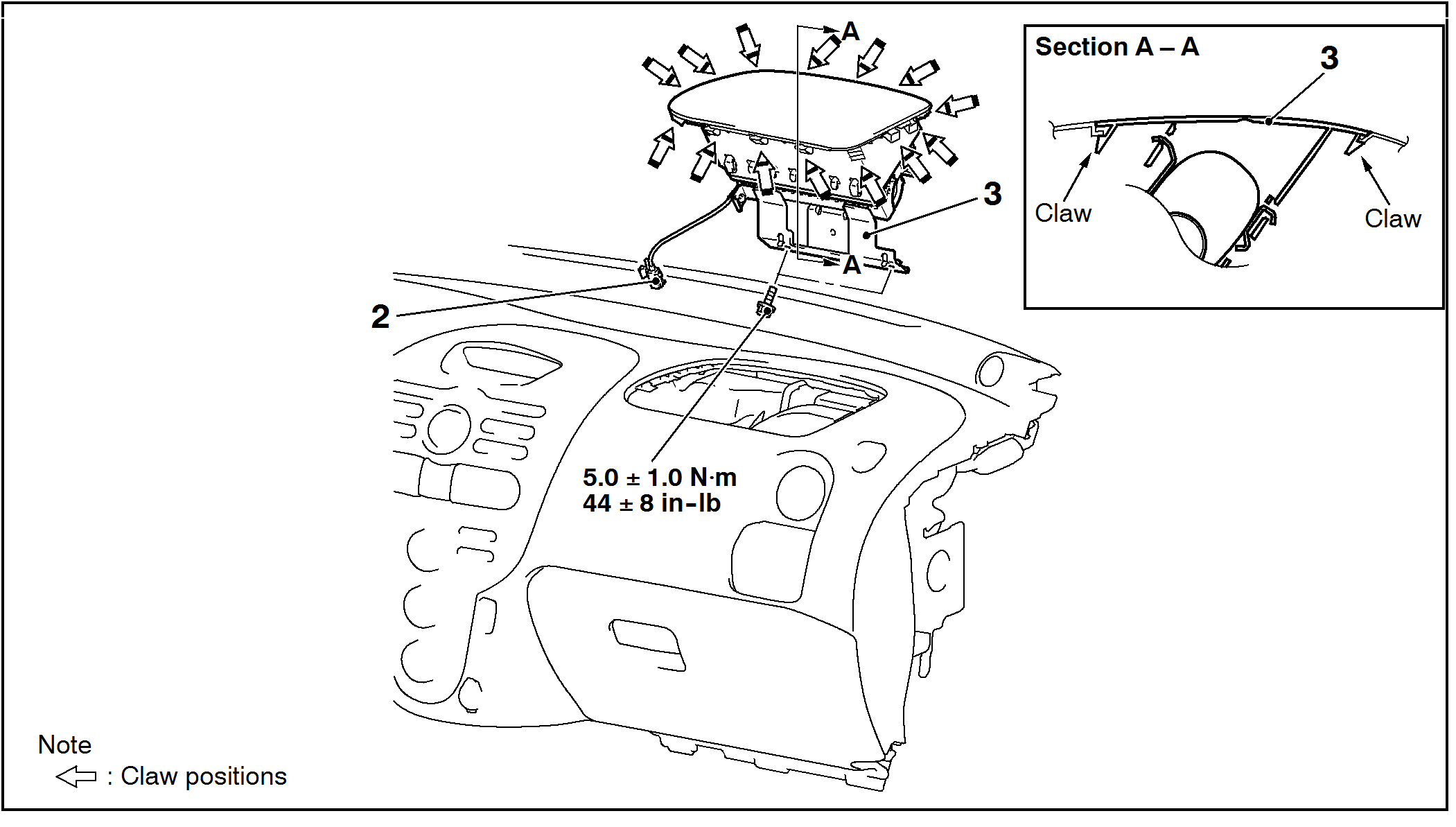 |
NOTE: Do NOT scratch or damage the dash or air bag module cover.
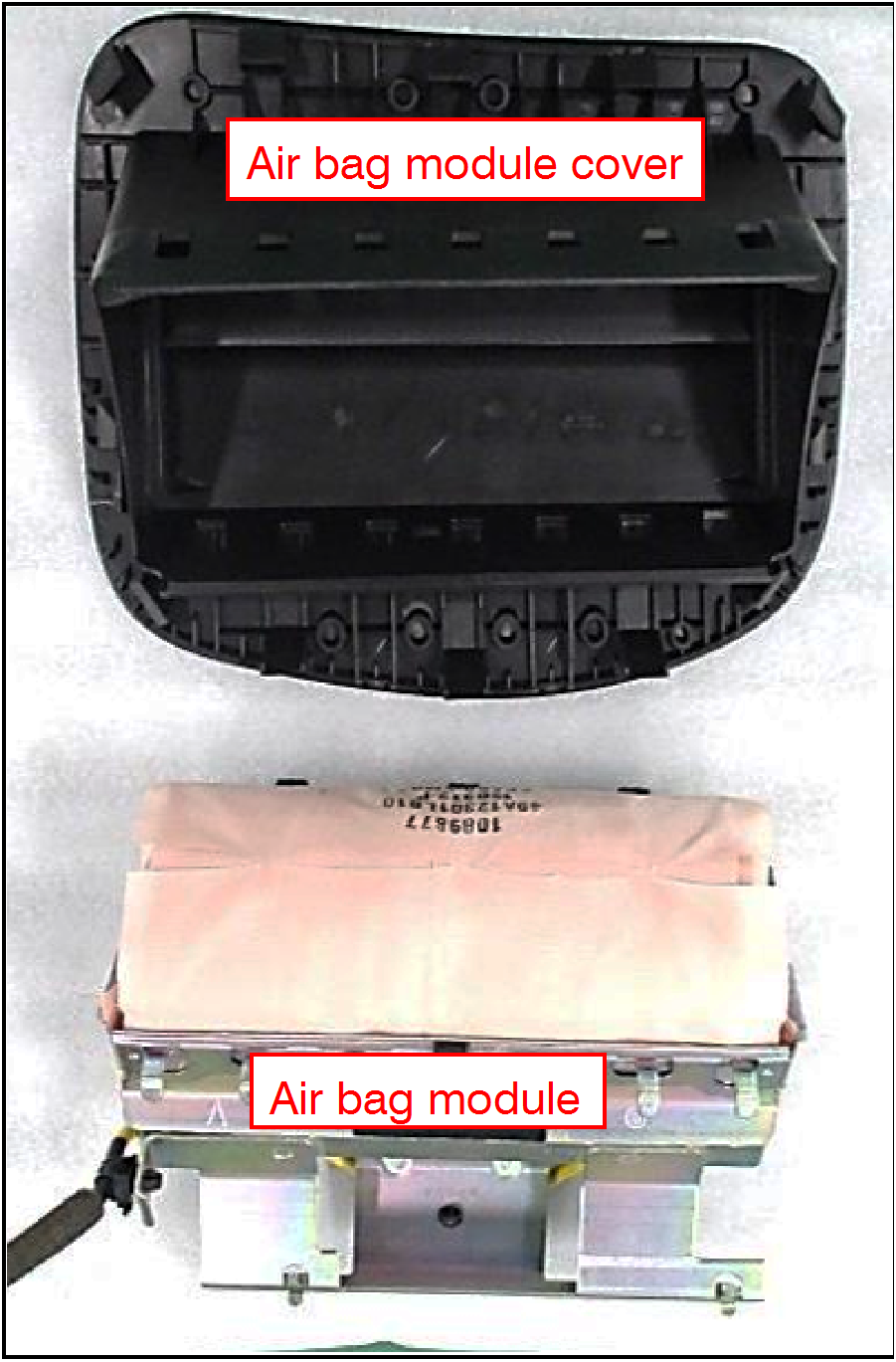
IMPORTANT: Do NOT discard the air bag module cover as it will be reused.
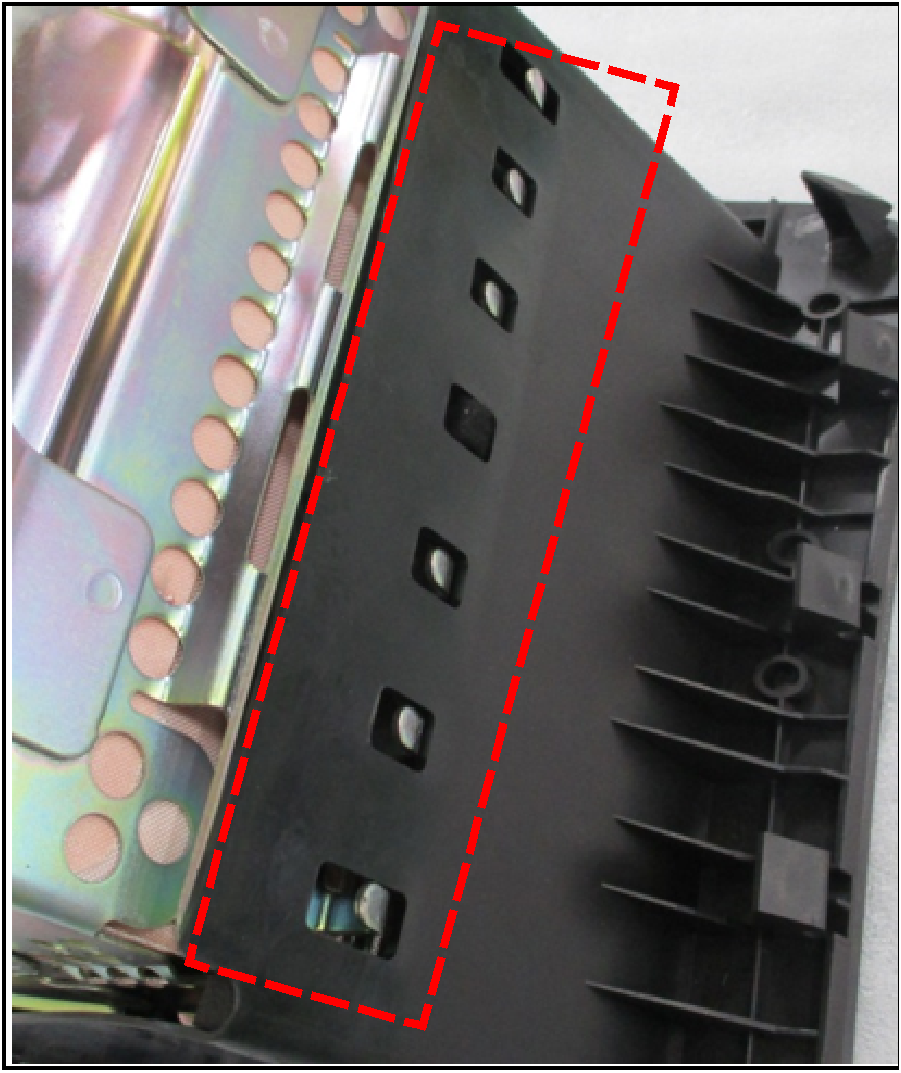
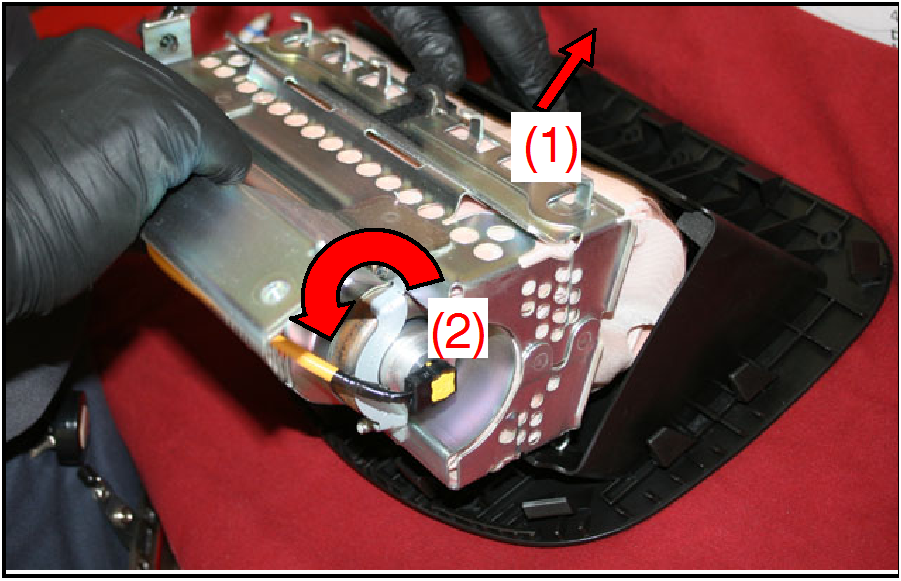
Do NOT damage the air bag module cover or the air bag module during removal.
The air bag module, and especially the air bag components, must be protected from adhesive, dirt, dust and sharp items.
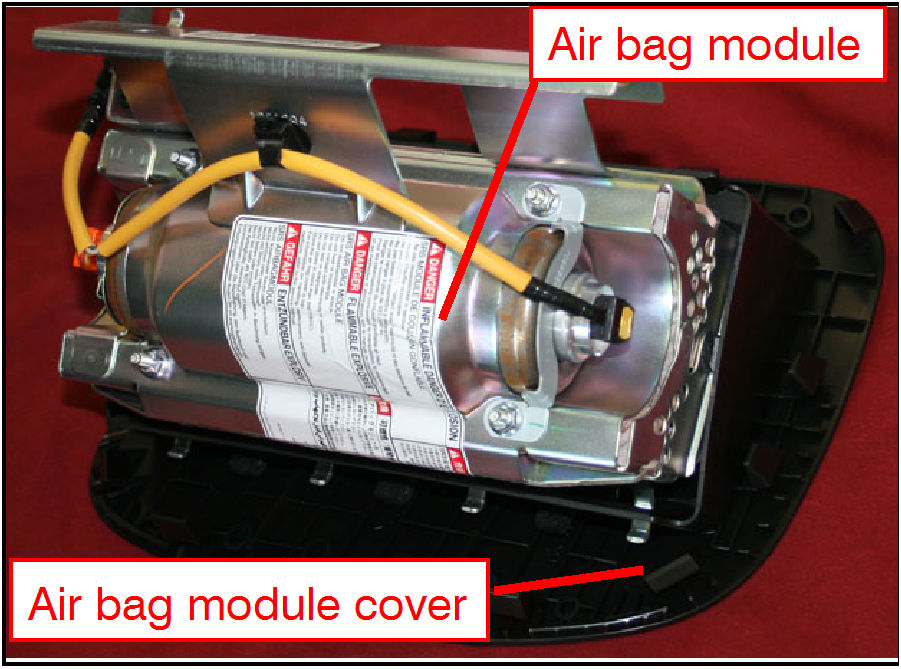 |
|
 |
|
 |
|
 |
|
 |
 |
|
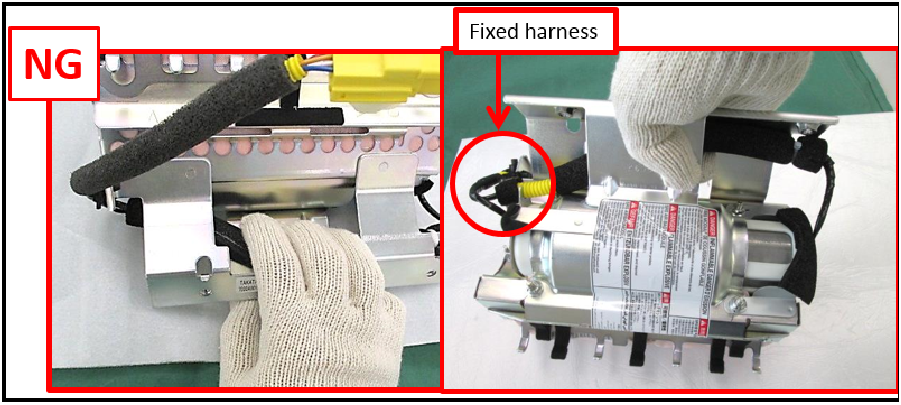 |
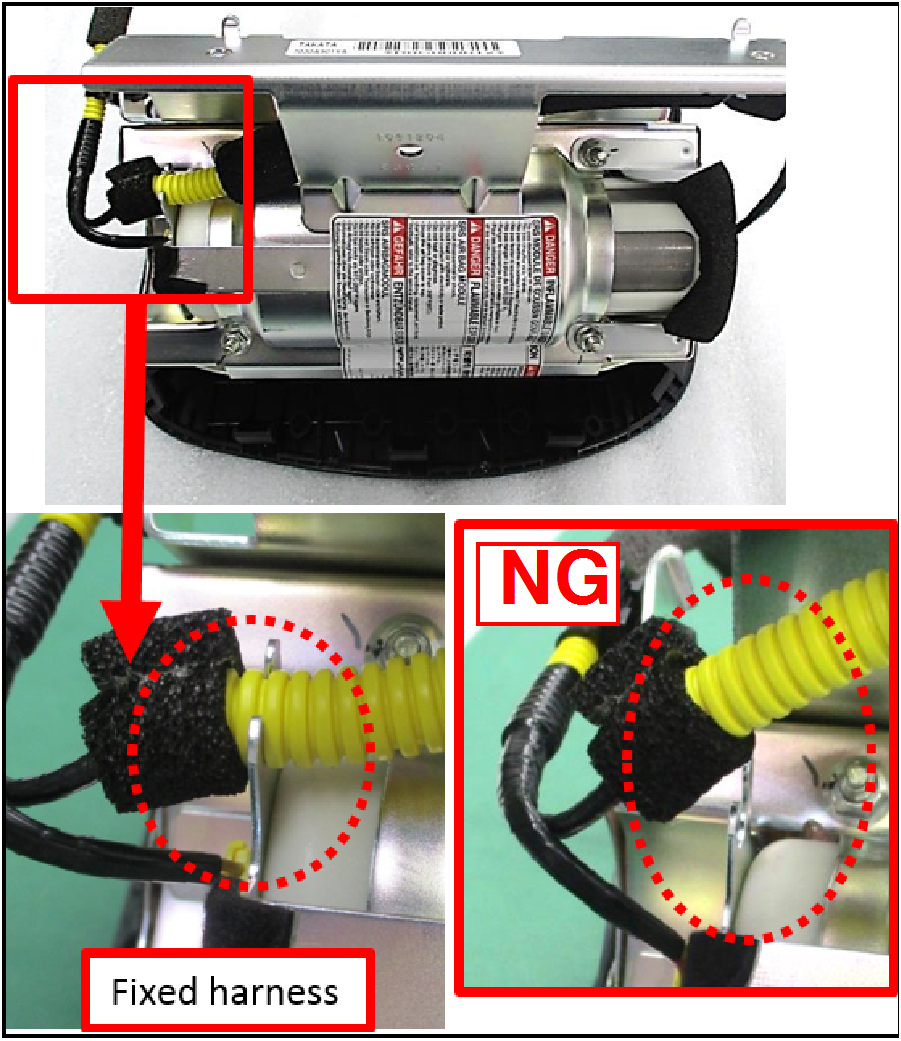
CAUTION: Do NOT pull on the harness or hold the harness while handling the air bag inflator module. The harness may separate or disconnect as a result. |
AIR BAG MODULE COVER INSTALLATION
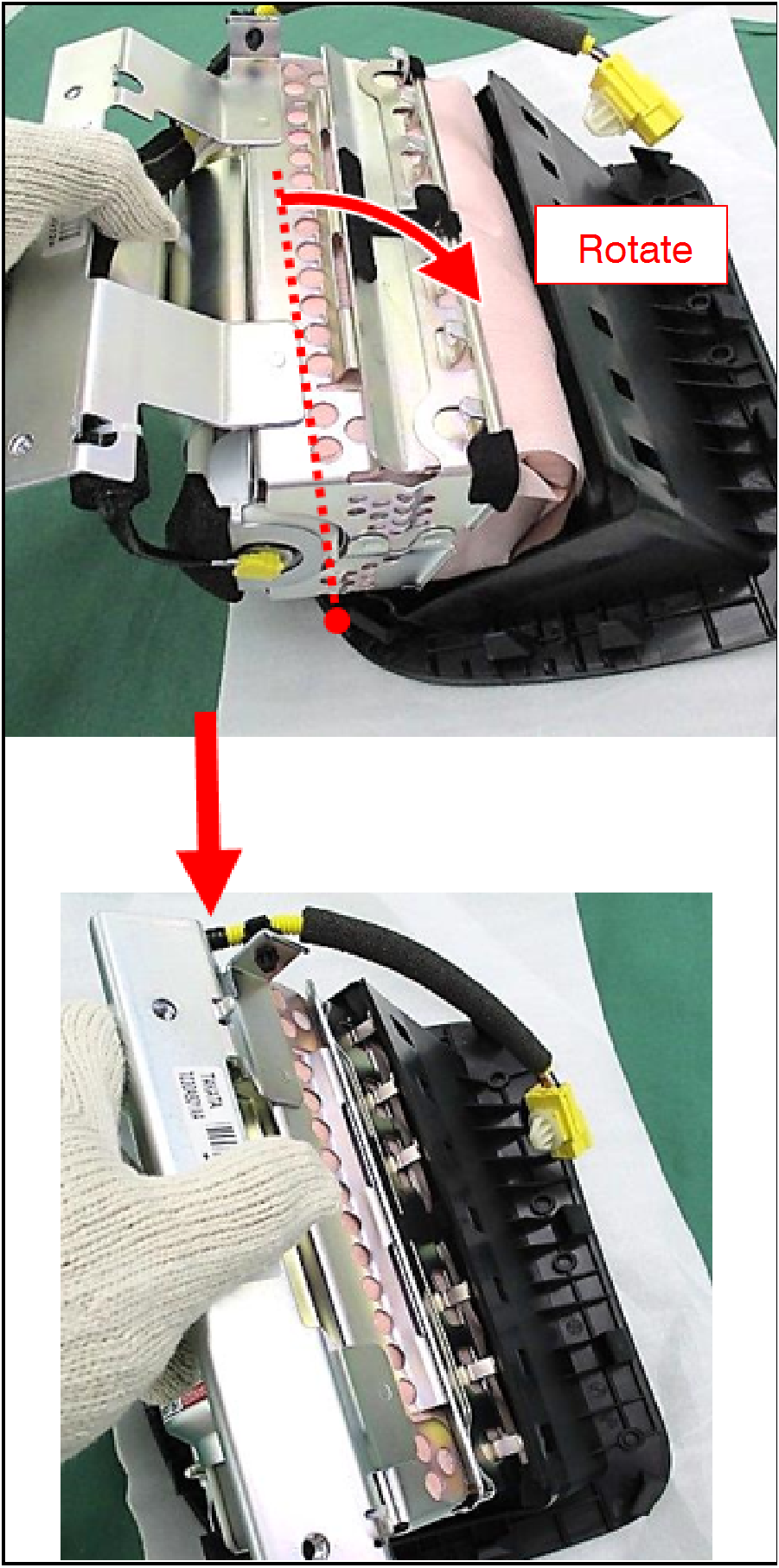
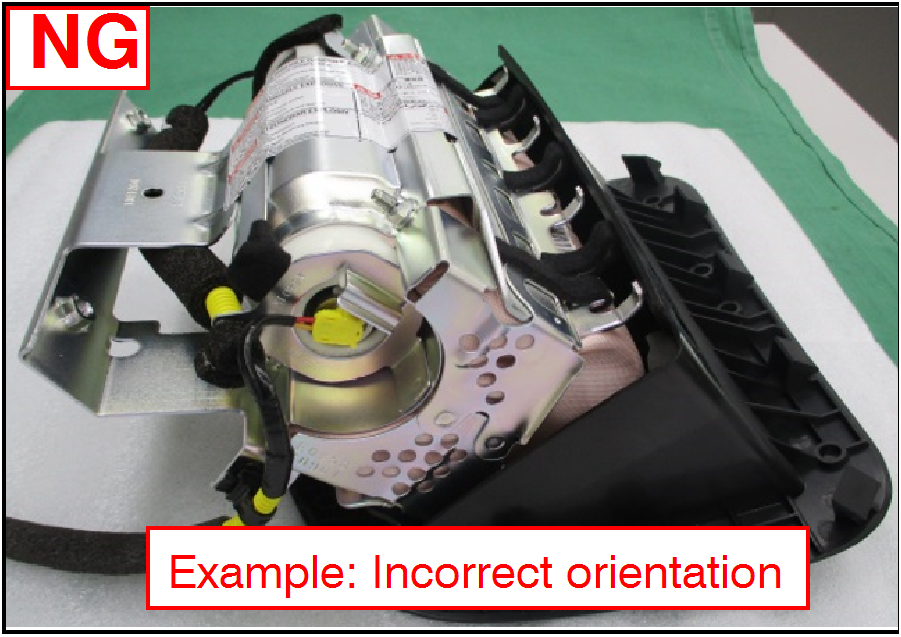 | CAUTION: Do NOT misalign the air bag module and air bag module cover. |
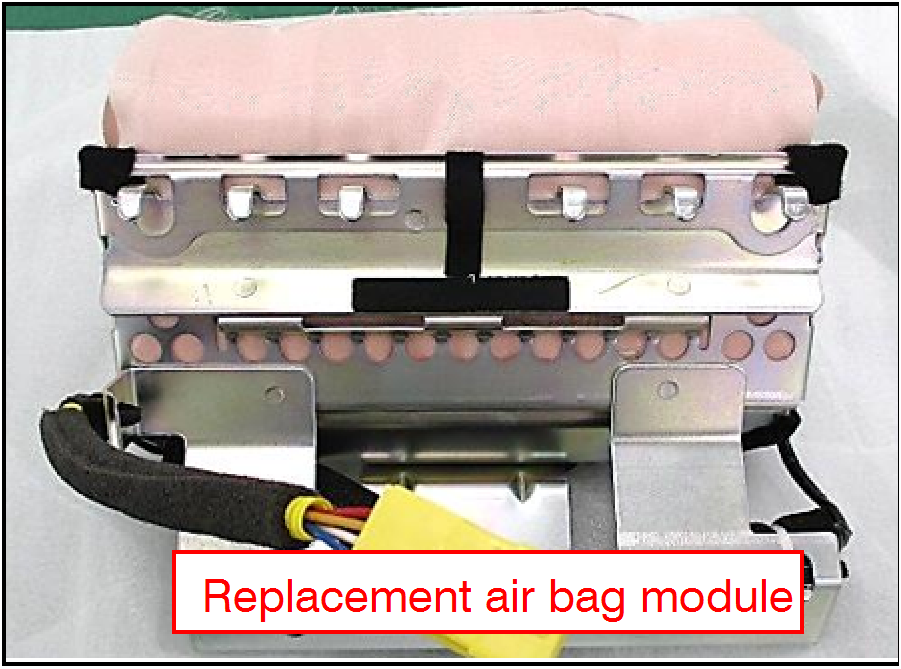 |
|
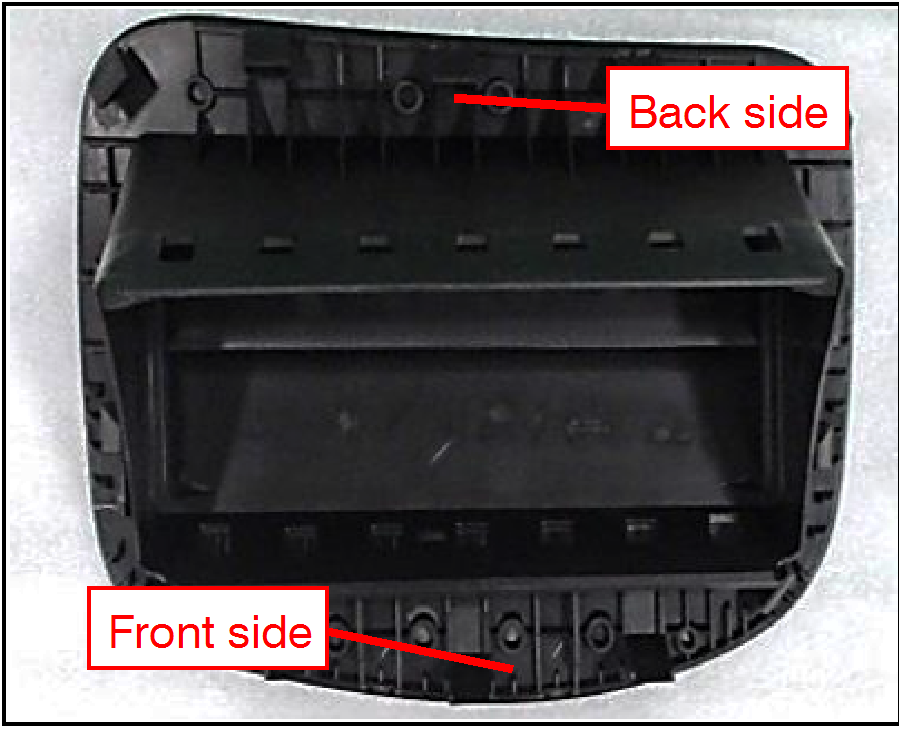 |
|
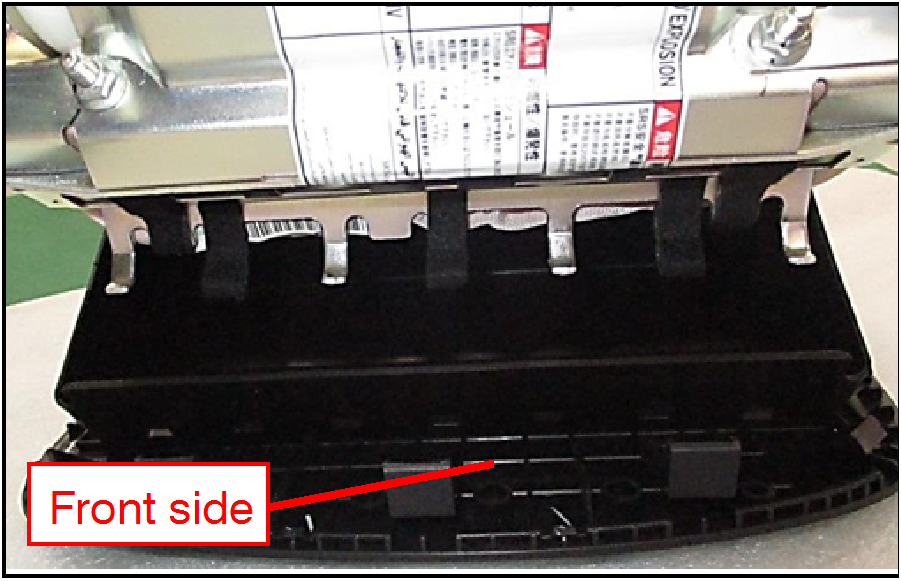 |
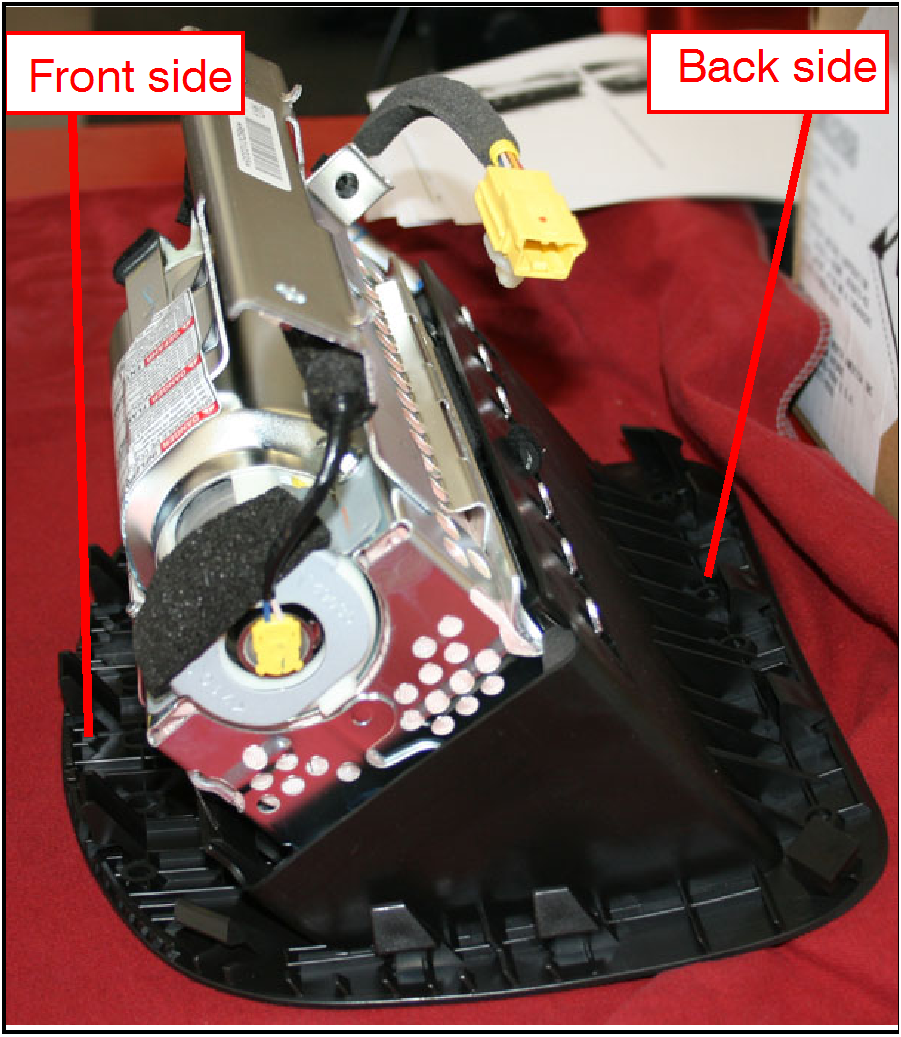
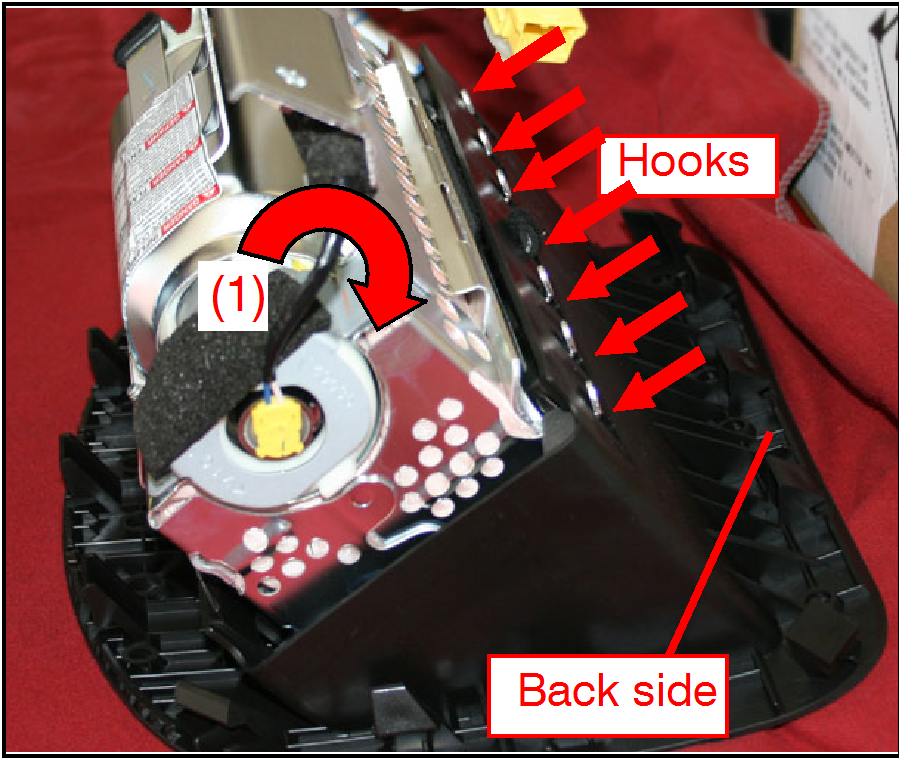
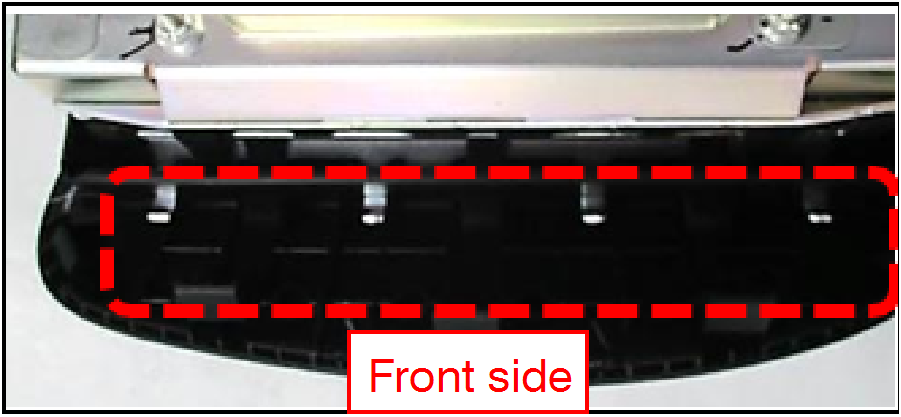
NOTE: There are 4 silver hooks on the Front side. |
 |
|
 |
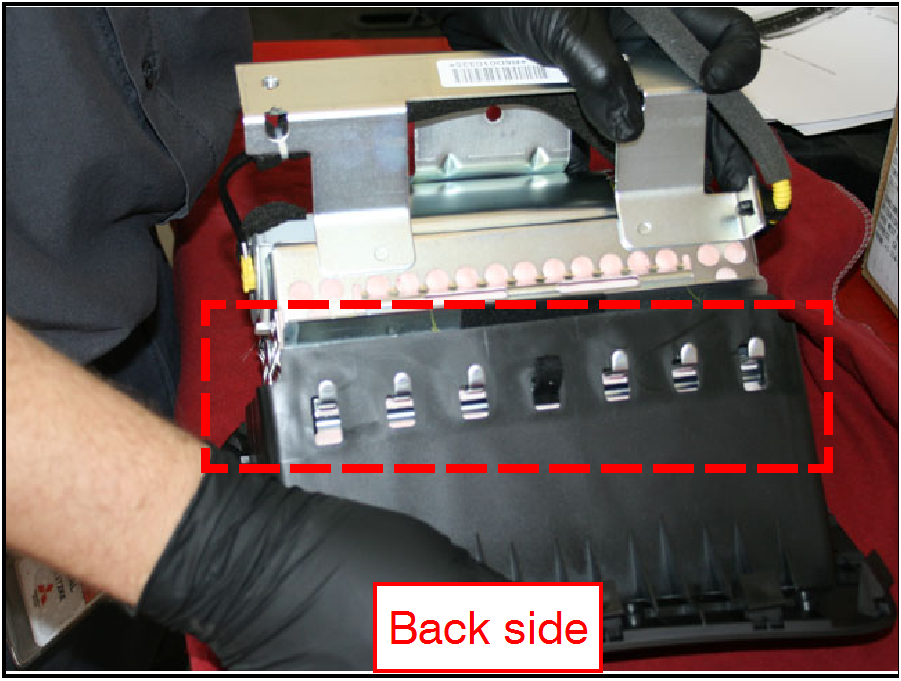
NOTE: There are 6 silver hooks on the Back side. |
 |
|
 |
|
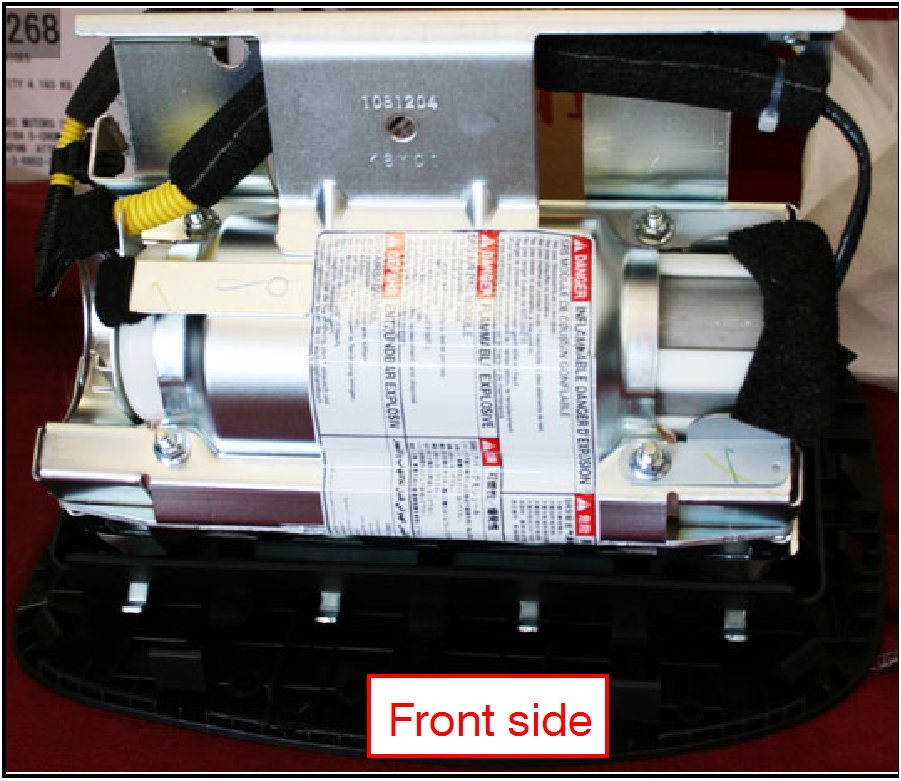 | |
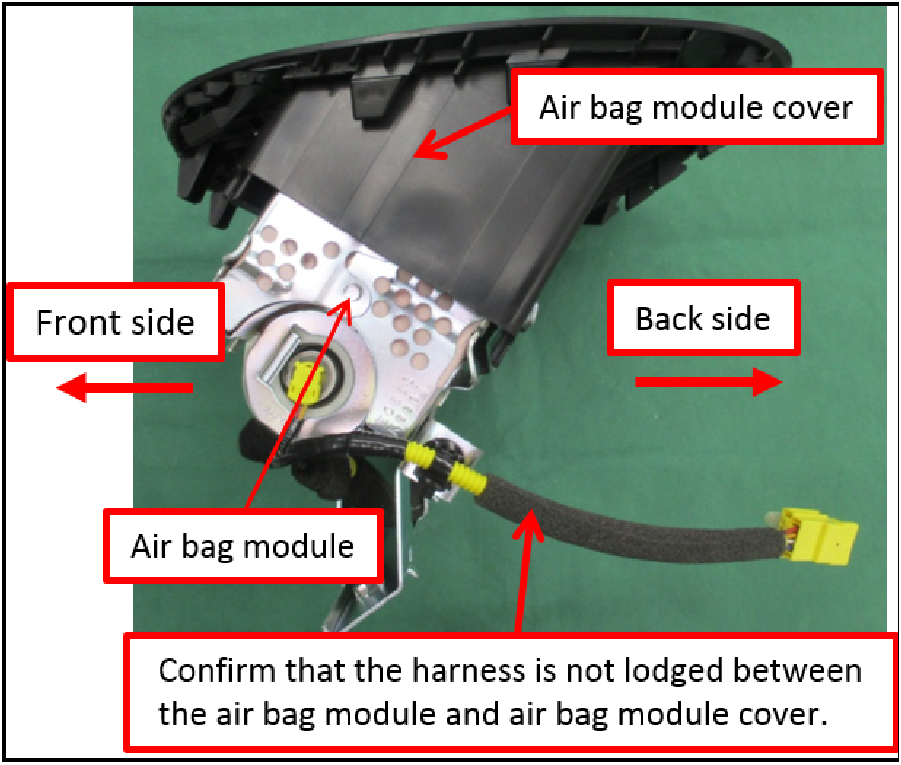 |
REINSTALLATION PROCEDURE
| CAUTION: Do NOT pull on the harness or hold the harness while handling the air bag inflator module. The harness may separate or disconnect as a result. |
| |
- Reinstall the air bag module and cover into the vehicle.
|
|
| |
|
|
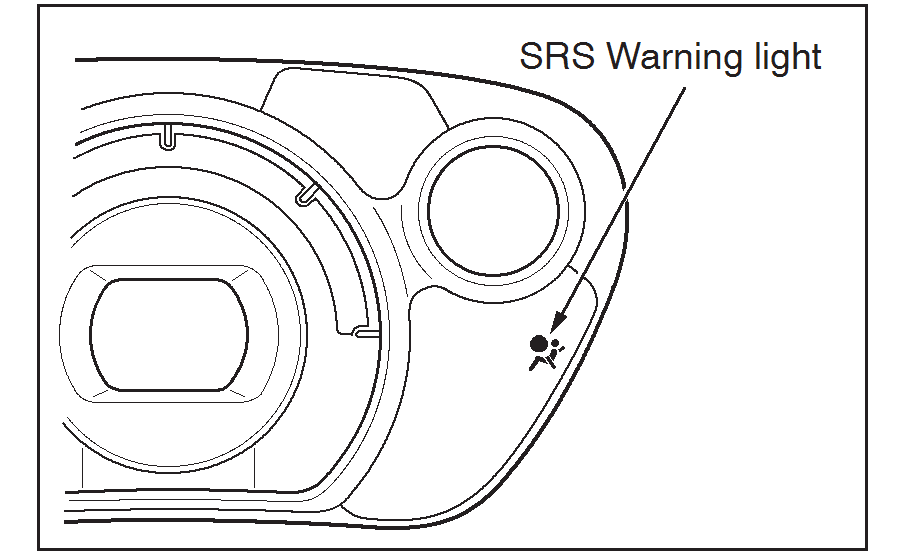 |
|
- Input radio station presets and set the clock, if applicable.
ERASE AND READ DTCs FROM ALL ECUs
- Connect the equipment as follows:
- Turn the laptop computer/tablet on.
- Connect the USB cable to the VCI/VCI Lite.
- When the laptop displays the MUT-III main screen, connect the USB cable to the laptop.
- Connect the MUT-III main harness ‘A’ with the blue DLC connector to the VCI Lite.
- Connect the blue connector of the MUT-III main harness ‘A’ to the vehicle’s data link connector.
NOTE: VCI Lite and laptop shown for illustration purposes only.
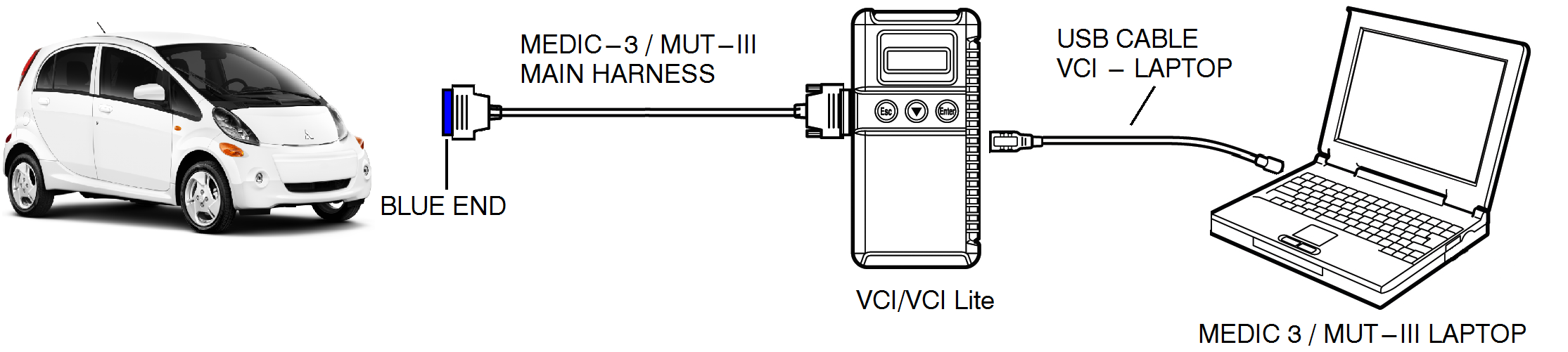
- Turn the electric switch to the “ON” position. Confirm the “READY” light is displayed.
NOTE: Ensure all accessories are off (e.g. lights, heating and AC system, audio/navi unit, etc…).
- From the MEDIC main page:
- Click on MUT-III SE.
- Select “All DTCs.”
- Select “Erase and read all DTCs.” If any DTCs appear, troubleshoot per the applicable service manual.
PARTS INFORMATION
Use only the Genuine Mitsubishi Parts listed below:
| Description | Part Number | Quantity |
|---|---|---|
| Kit, Air Bag Inflator | 7030A918 | 1 |
IMPORTANT: Do NOT deploy any inflator.
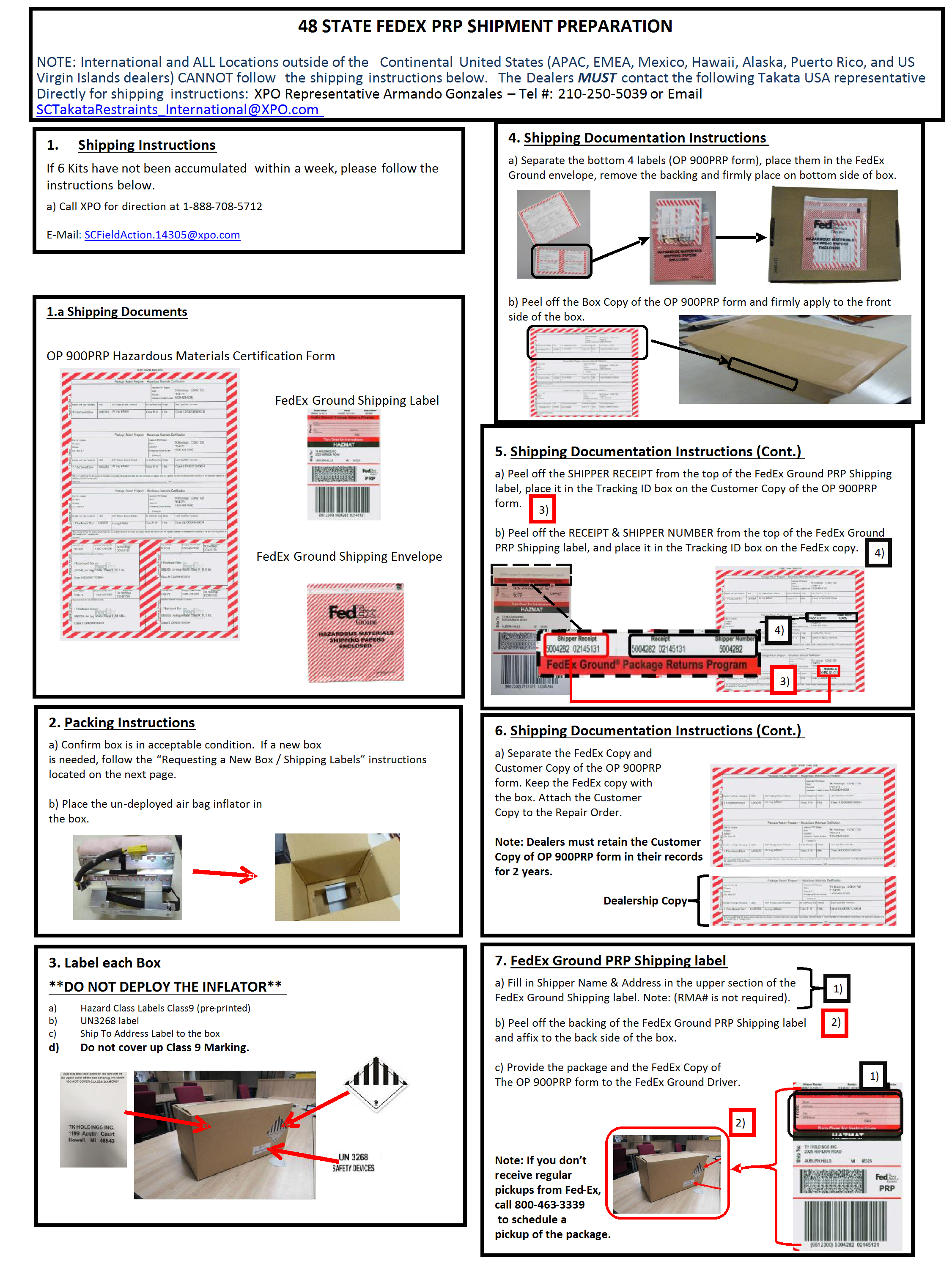
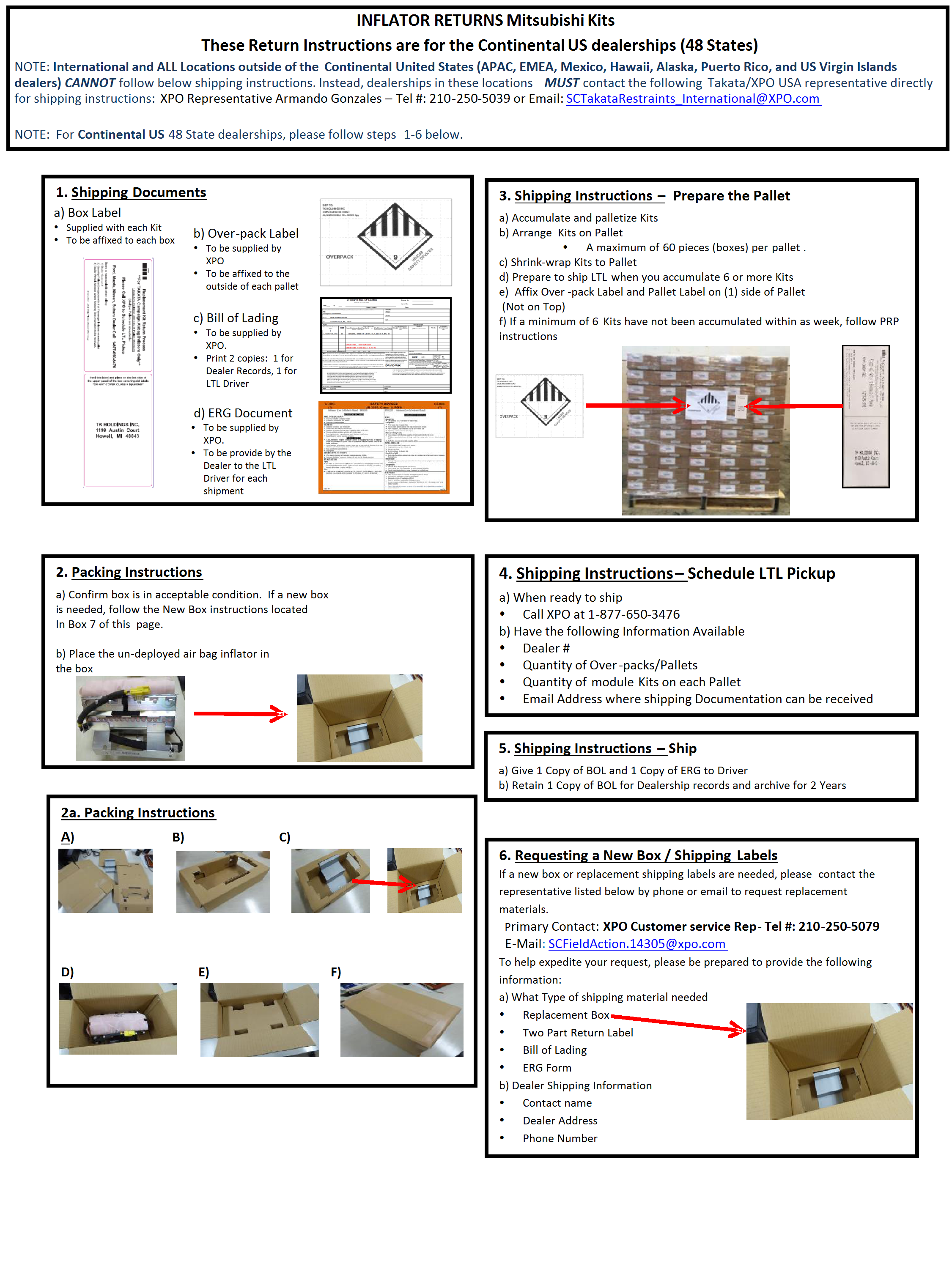
Return the removed air bag inflator module to Takata by contacting the following Takata USA representatives directly to obtain the appropriate return shipping documents:
Miguel Prigadaa, Armando Rodriguez
Phone: 210-250-5079
Email: [email protected]
The removed air bag inflator modules are to be returned to Takata once per week. If you have NOT accumulated 6 inflator modules after one week, follow the return procedures on page 15. If you have accumulated 6 or more inflator modules after one week, follow the inflator return procedures on page 16.
There will not be a system generated material return request. Regardless, the campaign claim is subject to chargeback if the replaced air bag inflator is not returned to Takata. Please make sure you keep a copy of proof of shipment with the repair order.
As the shipper, you are responsible for proper packing and document completion. The person packaging the inflator must have received hazardous material training per 49 CFR 172.702, and the training records must be on file at your dealership. The US Department of Transportation will impose substantial fines and/or penalties on the shipper if either packaging, labeling or documentation is not properly prepared and Customer Copy of OP 900PRP form is not kept on file for a minimum of 2 years.
| DO NOT SHIP REPLACED INFLATORS TO MMNA. SHIP ONLY TO TAKATA. |
WARRANTY INFORMATION
There is only one repair scenario for this campaign.
| # | Repair Procedure | Campaign Operation | Labor Time Allowance | Part Number | |
|---|---|---|---|---|---|
| 1 | Replace air bag inflator kit | C1709E01 | 0.4 hours | 7030A918 | |
Enter all claims as claim type ‘C’ – Recall/Campaign Claims
Please follow the campaign instructions when entering each claim in order to select the applicable operation codes that correctly match up with the work that was actually performed. A claim example is provided below.
Claim Header Section: Air Bag Inflator Replacement
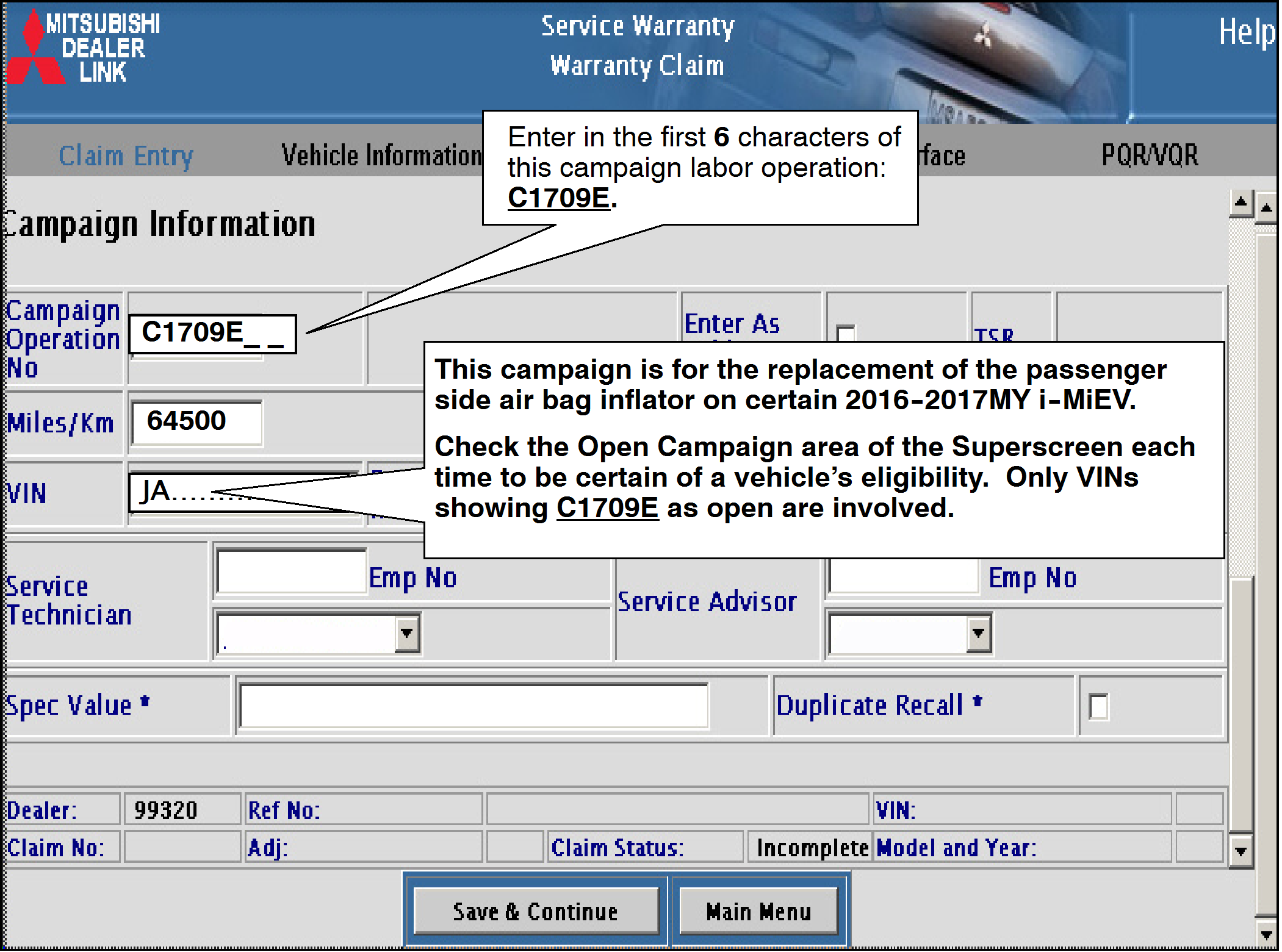
After entering the required customer data, vehicle information and applicable campaign operation number, hitting the “Save and Continue” button will automatically fill-in several fields. Please note that there is only 1 possible repair scenario for this campaign.
PARTS:
There is only one repair scenario and it requires the replacement of the passenger air bag inflator.
Scenario #1 – on 2016-2017MY i-MiEV vehicles – replace the air bag inflator kit.
Part# 7030A918.
No other parts are needed or allowed to be claimed.

LABOR:
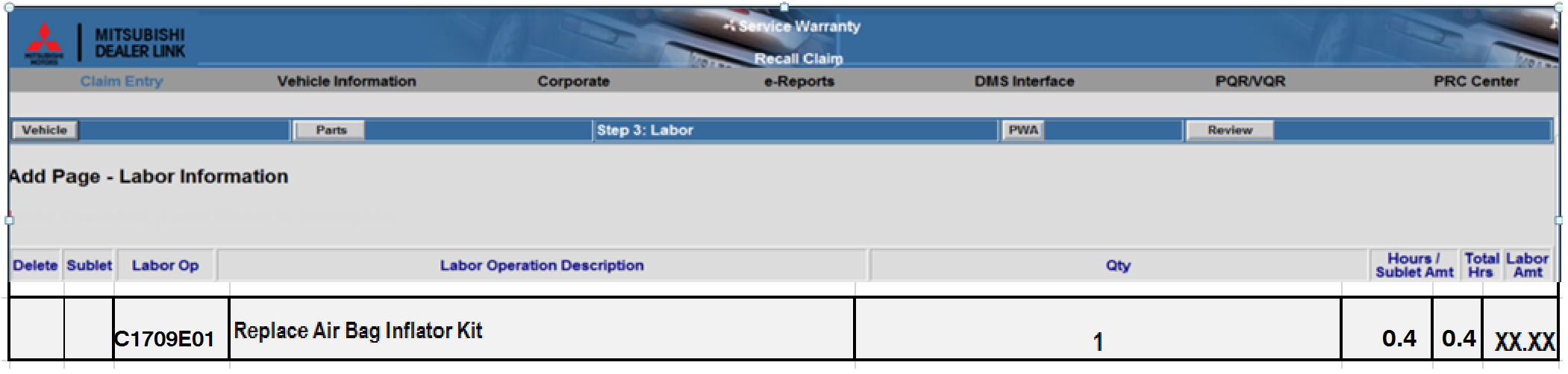
The full service campaign labor operation number C1709E01 and the allowed labor time of 0.4 hours will be automatically entered as a result of the ‘Repair Performed’ scenario selected from the “Vehicle” page.
PARTS RETURN:
Return the removed air bag inflator module to Takata by contacting the following Takata USA representatives directly to obtain the appropriate return shipping documents. Failure to return a replaced module to Takata may result in a chargeback of the campaign claim.
Miguel Prigadaa, Armando Rodriguez
Phone: 210-250-5079
Email: [email protected]
RENTAL CARS AND/OR TOWING CHARGES:
If there is a need to provide the owner with a rental car and/or tow their vehicle, claim the applicable charges in this section of the claim on the lower portion of the labor entry screen.

December 2017
December 2017
December 14, 2017
December 13, 2017

- [Easy to Use—Work Out of the Box] + [FOXWELL 2026 New Version] FOXWELL NT604 Elite scan tool is the 2026 new version from FOXWELL, designed for car owners who want to figure out the cause of issues before fixing car problems by scanning common systems like ABS, SRS, engine, and transmission. The NT604 Elite obd2 scanner diagnostic tool comes with the latest software—no need to waste time downloading software first. Plug the scanner into the OBDII port with OBDII cable to start the diagnosis.
- [Affordable] + [Reliable Car Health Monitor] Will you be confused what happens when the warning light of ABS/SRS/transmission/check engine flashes? Instead of taking your cars to dealership, this FOXWELL scanner will help you do a thorough scanning and detection for your cars and pinpoint the root cause. Note:The device is a diagnostic tool, not a repair tool. To turn off a warning light, you must first physically repair the issue causing it. Only then can the scanner be used to clear the corresponding fault code.
- [5 in 1 Car Diagnostic Scanner] Compared with obd scanners (50-100), NT604 Elite code scanner not only includes their OBDII diagnosis but also serves as ABS/SRS scanner, transmission and check engine code reader. When it’s an odb2 scanner, you can use it to check if your car is ready for annual test through I/M readiness menu. In addition, live data stream, built-in DTC library, data play back and print, all these features are a big plus for it. Note: doesn't support maintenance functions like reset or relearn. For the SRS system, NT604 Elite can read and clear common fault codes not caused by a crash, but crash/collision data cannot be cleared.
- [Fantastic AUTOVIN] + [No extra software fee] Through the AUTOVIN menu, this NT604 Elite car scanner allows you to get your V-IN and vehicle info rapidly, no need to take time to find your V-IN and input one by one. What's more, the NT604 Elite ABS SRS scanner supports 60+ car brands from worldwide (America/Asia/Europe). You don’t need to pay extra software fee. AUTOVIN may not work on some older vehicles or certain vehicle brands. If AUTOVIN fails, please input the vin code manually or go to the Diagnostic Menu to select your vehicle model.
- [Solid protective case KO plastic carrying bag] + [Lifetime update] Almost all same price-level car scanner diagnostic tool only offers plastic bag to hold the scanner.However, NT604 Elite automotive scanner is equipped with solid protective case, preventing your obd2 scanner from damage. Then you don’t need to pay extra money to buy a solid toolbox.

- 【Reset ABS/SRS/Transmission/Engine Lights】 More than an check engine code reader, OBDMATE OM901 obd2 scanner performs comprehensive diagnostics for the 4 most-used systems (ABS/SRS/Engine/Transmission). It quickly clears fault codes, turns off warning lights, read data stream and auto VIN.
- 【3.5" Handheld Scanner with 4 System Diagnose】 3.5" Super large TFT screen equipped displays an intuitive menu and clear readings of various sensors from ABS, SRS, ECM and TCM systems. It arrived with a silicone protective case and hard-shell carrying case, ensuring long-lived durability and drop resistance. The car diagnostic tool is plug-to-play designed, plug it and get diagnosis started without any batteries or updates required.
- 【One-Click I/M Readines&Full OBD2 Functions】 Press F1 to get an intuitive corloured form about whether various emissions-related systems on the vehicle are operating properly. Help you get smog-check ready quickly. OM901 car scanner supports all essential OBD2 functions you need: read & clear codes, view freeze frame, read I/M readiness, retrieve VIN, live data stream (with graphing display), O2 sensor test, onboard monitoring mode, and EVAP leak test.
- 【Battery Voltage Check&DLC Pin Test】 It allows you to monitor battery health by testing current battery voltage. Plus, this obd2 diagnostic tool features DLC 16-PIN test to check current voltage of every pin.
- 【Automotive Scanner Diagnostic Kit】 The package comes with 1 car scanner, 1 USB-type c cable, 1 hard storage bag and 1 user manual(en). Free to update without any hidden fees. 5 languanges available in setting including English, French, Italian, German and Espanish. Valuable and Portable, making it a great tool kit for car owners, DIY enthusiasts, and professional mechanics.
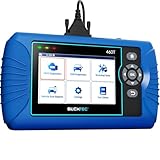
- [All System Diagnostics, Professional-Level Scanner] - BLCKTEC 460T is the ultimate OBD2 diagnostic tool for home mechanics and professionals. It supports all 10 OBD2 modes, reads and clears Engine/Transmission/ABS/SRS codes, performs All-System Diagnostics, offers workshop reset tools, and provides real-time live data. It helps you pinpoint issues, assess your car's condition, and prepare for SMOG checks with ease. NOTE: Function availability depends on your vehicle. Before you buy, be sure to use the Compatibility Checker on BLCKTEC website or contact our customer support to verify that the features you need are supported for your vehicle’s specific year, make, and model.
- [12+ Most Popular Reset Functions] - BLCKTEC 460T OBD2 scanner offers 12+ dealer-level service functions, including Oil Maintenance Reset, ABS Bleeding, EPB Reset, SAS(Steering Angle Sensor) Recalibration, DPF(Diesel Particulate Filter) Reset, Throttle Body Relearn, Battery Reset/Initialization, TPMS Relearn, Transmission Reset, Fluid Change Reset, Maintenance Reset and more, enabling you to perform workshop services like a pro. NOTE: Function availability depends on your vehicle. Be sure to use the Compatibility Checker on BLCKTEC website to verify that the features you need are supported for your vehicle.
- [Real-Time OBD2 and OEM Live Data, Freeze Frame Data] - BLCKTEC 460T helps diagnose vehicle issues when warning lights like Check Engine Light or ABS/SRS Light appear. It offers detailed DTC info, ECU Freeze Frame Data, and real-time OBD2 and advanced OEM live data, including Engine, Transmission, ABS, SRS, and more, making it easy to diagnose and resolve vehicle problems. You can view, graph, record, replay, and overlay up to four live data streams in a single graph for better analysis.
- [AutoVIN, AutoReLink, AutoScan, 3X Faster] - Equipped with AutoVIN technology, 460T automatically retrieves the VIN to save you time. Its AutoScan and AutoReLink features scan all of the vehicle's ECUs and detect any fault codes immediately after you plug the scanner into the vehicle's OBD2 port - no button presses required. Additionally, it regathers DTC and I/M readiness information every 30 seconds, simplifying monitor tests. 460T's advanced technology makes it 3X faster than other products.
- [Get RepairSolutions2, the #1 Auto Repair App for Free] - When paired with RepairSolutions2(RS2) App, 460T becomes even more powerful. RS2's Verified Fix Database built by master technicians, provides the parts needed for the repair. Additionally, RS2 gives you access to OEM warranty info, maintenance schedules, TSB, and dealership recall info, making car care easier than ever. RS2 is free with no subscription fees and it stores your car scan reports in the cloud, allowing you to access, share, or print them anytime and anywhere.

- OBD2 SCANNER FOR ALL SYSTEMS – The INNOVA SD35 is a tablet-based OBD2 scanner designed for advanced diagnostics. Read and clear check engine light, ABS, SRS, and TPMS codes, plus test your car battery and alternator to prevent unexpected failures. Vehicle coverage may vary. Please use Innova’s Coverage Checker to verify compatibility.
- ALL-SYSTEM DIAGNOSTICS & LIVE DATA – Unlike basic code readers, this OBD2 scanner for all vehicles scans engine, transmission, ABS, SRS, and more. Get real-time live data, including RPM, fuel trims, temperature readings, and oxygen sensor performance.
- OBD2 TABLET WITH USER-FRIENDLY INTERFACE – This automotive scan tool features a high-resolution display, making vehicle diagnostics faster and easier.
- ADVANCED TPMS, OIL RESET & SERVICE FUNCTIONS – Perform TPMS sensor checks, oil light reset, and other service resets with ease This professional diagnostic tool provides comprehensive vehicle maintenance capabilities in one device.
- WIDE VEHICLE COVERAGE (1996 & NEWER CARS & TRUCKS) – This OBD2 scanner Bluetooth tablet is compatible with Toyota, Ford, Honda, Chevrolet, Nissan, Dodge, and more. However, feature coverage may vary. Please use Innova's Coverage Checker to verify coverage.

- ✔️【Professional SRS Reset for 1994-2003 BMW】 Designed specifically for classic BMW models (1994-2003). This B800 scanner reads & clears SRS airbag fault codes, turns off the warning light, and saves you a costly dealer visit. Confirmed compatible with: E36, E46 (EXCEPT 2001 330i), E34, E38, E39, Z3, and X5 (E53). NOT compatible with any BMW built before 1994 or after 2003.
- ✔️【Important: Two Different Connection Ports – Read Before Use】 To avoid “not working” issues, please note: For 1994–2000 BMWs (most E36, E34, Z3, early E39), the SRS diagnostic port is a round 20-pin connector under the hood. You MUST use the included 16-pin to 20-pin adapter cable. For 2000–2003 models (late E46, E39, X5), use the standard OBD-II port inside the cabin. Incorrect connection is the #1 reason for “incompatibility” reports.
- ✔️【Read & Clear Fault Codes in Minutes】 Quickly diagnose why your SRS light is on. The scanner accurately reads fault codes from airbag and seatbelt pretensioner systems. With one button press, clear the codes and reset the SRS warning light in seconds. No expensive dealer tools needed.
- ✔️【User-Friendly for DIYers – No Mechanic Required】 Easy operation with an intuitive button layout: ‘Enter’ to confirm, ‘Scroll’ to navigate. The clear LCD screen shows results instantly. Includes a step-by-step manual (revised for clarity) to guide you through the entire reset process.
- ✔️【Reliable Support with 1-Year Warranty】 We stand behind the quality of our B800 scanner. It comes with a 1-Year Hassle-Free Warranty. If you have any questions or need support, please contact us with your Order ID, and our dedicated team will assist you promptly.
This product presentation was made with AAWP plugin.